Guides › Communication
Likes
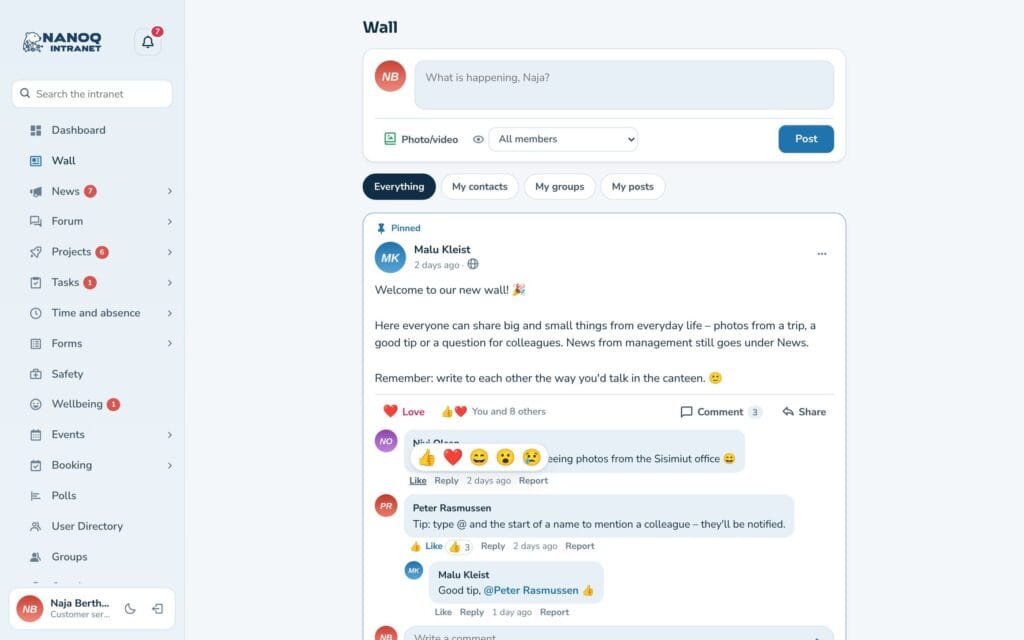
Like posts, comments, news, forum topics, photos and events – or choose another reaction.
What the module does
The Like button is found on the wall’s posts and comments, under news and forum topics, in the photo lightbox and in the event pop-up. The module is off until an administrator turns it on.
Give a reaction
- Click Like for a thumbs-up. Click again to remove it.
- Hold the mouse over the button – or your finger on the button on the phone – to choose Love, Haha, Wow or Sad.
- With the keyboard: arrow up on the button opens the reactions.
See who
Next to the button it says, for example, “You and 8 others”. Click the text to see who has reacted, and with which reaction.
Notifications
The author gets one combined notification under the bell – “Anna and 2 others like your post”. No email or push is sent by default, but you can change that under Settings → Notifications (Likes).
For administrators
Under Nanoq → Wall:
- Likes – turns the module on and off (default: off).
- More reactions – love, haha, wow and sad in addition to Like (default: on).
Good to know
- If someone removes their reaction and gives it again the same day, no new notification is sent.
- The reactions follow the modules – if Photos is turned off, there are no reactions on photos either.